How to Activate iviewHD IPTV?
This article will teach you how to activate the tutorial to use the active device after obtaining a free trial or IPTV subscription.

How to activate iviewHD IPTV?
The process of activating iviewHD IPTV is very simple, please follow these steps
Step1: When your order is submitted, your subscription code will be sent by the automatic delivery system.
You can check your subscription code here or read this guide to learn how to get a three-day free trial.
Step2: Download our IPTV Apk to your android device.
Please note: that we have three versions of the subscription,And every subscription plan has a PAD &STB version.Make sure the download version matches the free trial or subscription plan you get.
1.iviewHD(Normal blue version)
2.iviewHD plus(Plus red Version)
3.iviewHD plus sub-device
Step3: -When you have successfully installed our IPTV Apk, Please open the application, then click Settings

-Enter your subscription code in the Active code field.
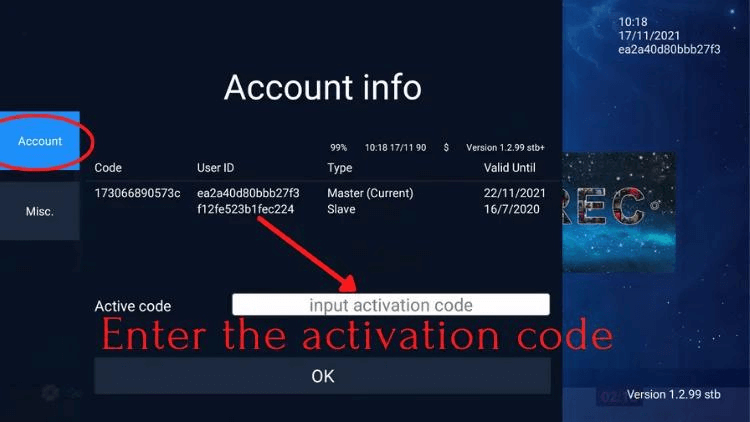
Now you can watch all your favorite channels with the best IPTV services.
If you don’t know how to install it, You can click on our IPTV to download & install tutorials


Comments
Post a Comment